In this article
For employees, the useful question is what a particular role allows: when you must be available, which hours you can move, how colleagues get help, and when the working day ends. For employers, the task is to make those expectations clear enough for people to deliver reliable work.
Here is how remote work is reshaping the traditional 9-to-5 workday—and what to check before changing your own schedule or accepting a remote job.
Separate location, working hours, and availability
A job advertised as remote tells you something about where work happens. The schedule needs its own explanation. A customer support role may require fixed coverage, while a project-based role may allow more choice within agreed limits.
Acas guidance on types of flexible working distinguishes arrangements such as remote work, flexitime, and compressed hours. Keeping those definitions separate makes an offer or policy easier to assess.
| Arrangement | The main change | What to clarify |
|---|---|---|
| Remote work | Work takes place away from the usual workplace. | Approved locations and required hours. |
| Hybrid work | Work is divided between remote and workplace settings. | Attendance, travel, and scheduling rules. |
| Flexitime | Start and finish times can vary within agreed limits. | Required hours and any shared availability window. |
| Asynchronous collaboration | Some work moves forward without simultaneous participation. | Response expectations, documentation, and escalation. |
| Compressed hours | The same total working hours are arranged over fewer days. | Daily workload, breaks, and service coverage. |
| Reduced hours | The total amount of scheduled work decreases. | Pay, responsibilities, and handovers. |
For example, a four-day arrangement could involve longer days with unchanged weekly hours, or a reduction in total hours. Ask which arrangement is being discussed before assessing whether it suits you.
One workload can fit several shapes of day
Removing a commute can create more room around the working day. Flexible hours can change its shape further, where the role and employer permit that change.
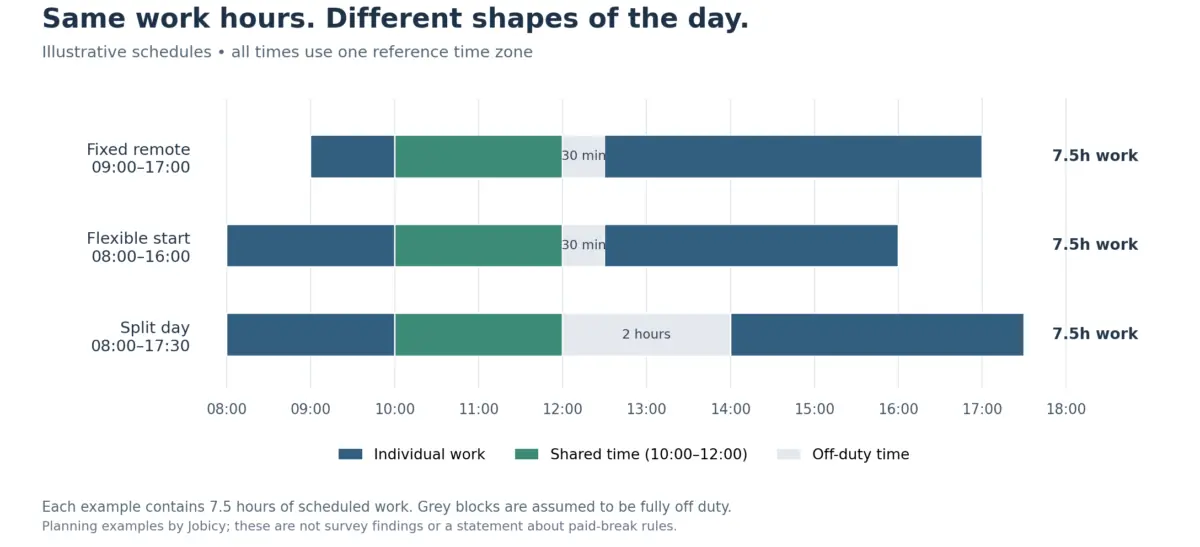
The chart below compares three illustrative schedules. Each contains 7.5 hours of work and a shared 10:00–12:00 window. All times use one reference time zone. The grey periods are assumed to be fully off duty for this illustration; actual contracted hours and paid-break arrangements vary.
| Example | Working periods | Off-duty period | Work total |
|---|---|---|---|
| Fixed remote | 09:00–12:00; 12:30–17:00 | 12:00–12:30 | 7.5 hours |
| Flexible start | 08:00–12:00; 12:30–16:00 | 12:00–12:30 | 7.5 hours |
| Split day | 08:00–12:00; 14:00–17:30 | 12:00–14:00 | 7.5 hours |
A predictable fixed schedule can provide a useful boundary. An earlier start might suit another employee. A split day may create a needed personal window, while also extending the time between starting and finishing work.
Assess the whole day when comparing options. Include care arrangements, appointments, household circumstances, and the availability your role requires. Jobicy’s guide to building a remote work routine explains how to turn those conditions into a workable schedule.
Asynchronous work changes how colleagues depend on each other
Shared office hours make it relatively easy to ask a question and discuss it immediately. Across different schedules or time zones, a team needs ways to move work forward while someone else is unavailable.
GitLab’s guide to asynchronous and non-linear working describes documentation and asynchronous workflows as foundations for arranging work across separate periods. This is one employer’s approach, rather than a promise attached to every remote role.
In practice, a useful written update identifies the current state of the work, the decision needed, who should respond, and the deadline. An illustrative request might read:
“The draft is ready in the project document. Please comment on the two pricing options by Tuesday at 14:00 UTC. I recommend option B for the reasons listed. If we need a live discussion, let’s use tomorrow’s shared window.”
Agree what happens if feedback does not arrive in time. Some decisions need approval before work continues; others can proceed within a person’s delegated authority. A deadline alone does not resolve that distinction.
Reserve live conversations for situations where they are useful, such as an unclear problem, a sensitive discussion, or an urgent incident. Record resulting decisions so colleagues on another schedule can understand what changed.
Flexibility can also stretch the working day
A movable start time creates little practical freedom if meetings, messages, and unfinished tasks fill every available period. Examine how work is distributed as well as where it happens.
Microsoft’s June 2025 Work Trend Index special report found a 16% year-over-year increase in meetings starting after 8 p.m. in its Microsoft 365 telemetry. The data ended February 15, 2025 and excluded education and EU tenants. These observations concern the measured users and do not establish that remote work caused the increase.
“the modern workday for many has no clear start or finish.”
Microsoft WorkLab, “Breaking down the infinite workday”, June 2025.
Useful boundaries need team support. Define an urgent contact route, decide which matters can wait, and clarify after-hours or on-call responsibilities. Where inconvenient cross-time-zone meetings are necessary, review who repeatedly bears that burden and what adjustments are possible.
If a supposedly flexible schedule keeps expanding, record examples: an evening meeting, a repeated late request, or a deadline that displaced agreed work. Use that evidence to discuss coverage, priorities, or workload. Jobicy’s work-life balance guide offers practical ways to frame those discussions.
Agree on outcomes and the time needed to deliver them
Clear deliverables make performance easier to discuss. A completed report, a reliable handover, or a resolved customer issue gives a team something concrete to review.
Acas guidance on managing home workers recommends agreeing clear objectives, how performance will be measured, and how people will communicate. Apply those discussions to the way the team actually works.
Working-time requirements also remain relevant. In the United States, the Department of Labor’s hours-worked guidance explains that work an employer permits can count as compensable time, including work beyond a scheduled shift. For covered, non-exempt employees, focusing on results does not remove applicable wage and overtime requirements.
A short team agreement can make everyday expectations easier to follow:
| Decision | What to write down |
|---|---|
| Working hours and availability | Required hours, shared windows, approved flexibility, and the named time zone. |
| Communication | Where updates belong, expected response windows, and the urgent route during relevant coverage periods. |
| Delivery and handovers | The output, deadline, quality criteria, reviewer, and information the next person needs. |
| Breaks and time away | Coverage, notice, and the process for adjusted hours or leave when needed. |
| Exceptions and review | On-call duties, unusual meeting times, temporary changes, and when to review the arrangement. |
Use calendar tools that display participants’ local times, and check recurring meetings when daylight-saving arrangements change. When planning a week, leave room for the coordination and review work attached to a deliverable. Jobicy’s workweek planning guide covers ways to account for those responsibilities.
Ask about the real working day before accepting a role
During a hiring process, request examples of how the team operates. Useful questions include:
- Which hours are fixed, and which can employees adjust?
- How frequently do meetings fall outside normal local working hours?
- How are urgent requests covered when someone is off duty?
- What happens when an employee needs help outside the team’s shared window?
- How are hours, workload, and performance reviewed?
A candidate could ask:
“Could you walk me through a typical week for this team? I’d like to understand required availability, meeting times, and how people use the flexibility described in the job advertisement.”
Use the answer alongside the written terms of the role. Jobicy’s guide to remote work interview questions can help you prepare for the wider conversation.
Remote work gives organizations more ways to arrange a working day. A useful arrangement makes responsibilities, availability, and time away understandable to everyone involved—and remains workable during an ordinary week.
 About the author Matt Semon
Career Writer · AI Hiring Trends · USA I’m Matt, a writer and researcher focused on how hiring is evolving in the age of AI. I’ve been following trends in recruitment, automation, and remote work since 2018. When I’m not writing deep-dive articles for Jobicy, I’m testing AI tools to see how they impact candidates and hiring teams.