
In this article
The popular myth of the “ATS black hole” is a convenient excuse for weak applications. The reality is far more clinical. Your resume is not thrown into a digital void; it is systematically dismantled, parsed, and ranked by high-performance data extraction pipelines.
In my twelve years auditing talent acquisition pipelines for distributed tech giants, I have watched organizations throw out up to 70% of highly qualified remote applicants simply because their resumes disintegrated during the automated ingestion phase. Modern Applicant Tracking Systems (ATS) like Lever and Greenhouse do not read resumes the way humans do. They use complex parsing engines to convert your carefully designed PDF into a structured JSON database profile.
If your layout confuses the parser, your skills are miscategorized, your dates are misread, and your profile is deprioritized before a human recruiter ever opens the file. To win the remote application game, you must write and format your resume for the database parser first, and the human hiring manager second.
Lever vs. Greenhouse: Two Distinct System Architectures
To optimize your resume effectively, you must understand the tool the company is using. While both are market leaders in the tech and remote hiring spaces, Lever and Greenhouse process candidate data with completely different structural philosophies.
Lever’s Search-First, Unified Database Philosophy
Lever is built around a single, unified database model known as LeverTRM. Unlike legacy systems that isolate applications by job opening, Lever treats every applicant as a permanent contact in a universal talent pool.
When you apply to a company using Lever, the system immediately parses your resume to check for matches against existing profiles. It looks for matching email addresses, phone numbers, and LinkedIn URLs to merge duplicate files.
{
  "candidate_profile": {
    "first_name": "Sarah",
    "last_name": "Chen",
    "unified_id": "usr_98231kjsd8",
    "extracted_skills": ["Golang", "Kubernetes", "gRPC", "Distributed Systems"],
    "current_role": "Senior Infrastructure Engineer",
    "inferred_seniority": "Senior"
  }
}
Once parsed, your profile sits in a searchable repository. Recruiters inside Lever rely heavily on Boolean search queries to source candidates for new roles from their existing database. If your resume lacks the exact keyword structures Lever’s search indexers expect, you remain invisible in passive sourcing sweeps.
Greenhouse’s Structured Hiring and Scorecard Architecture
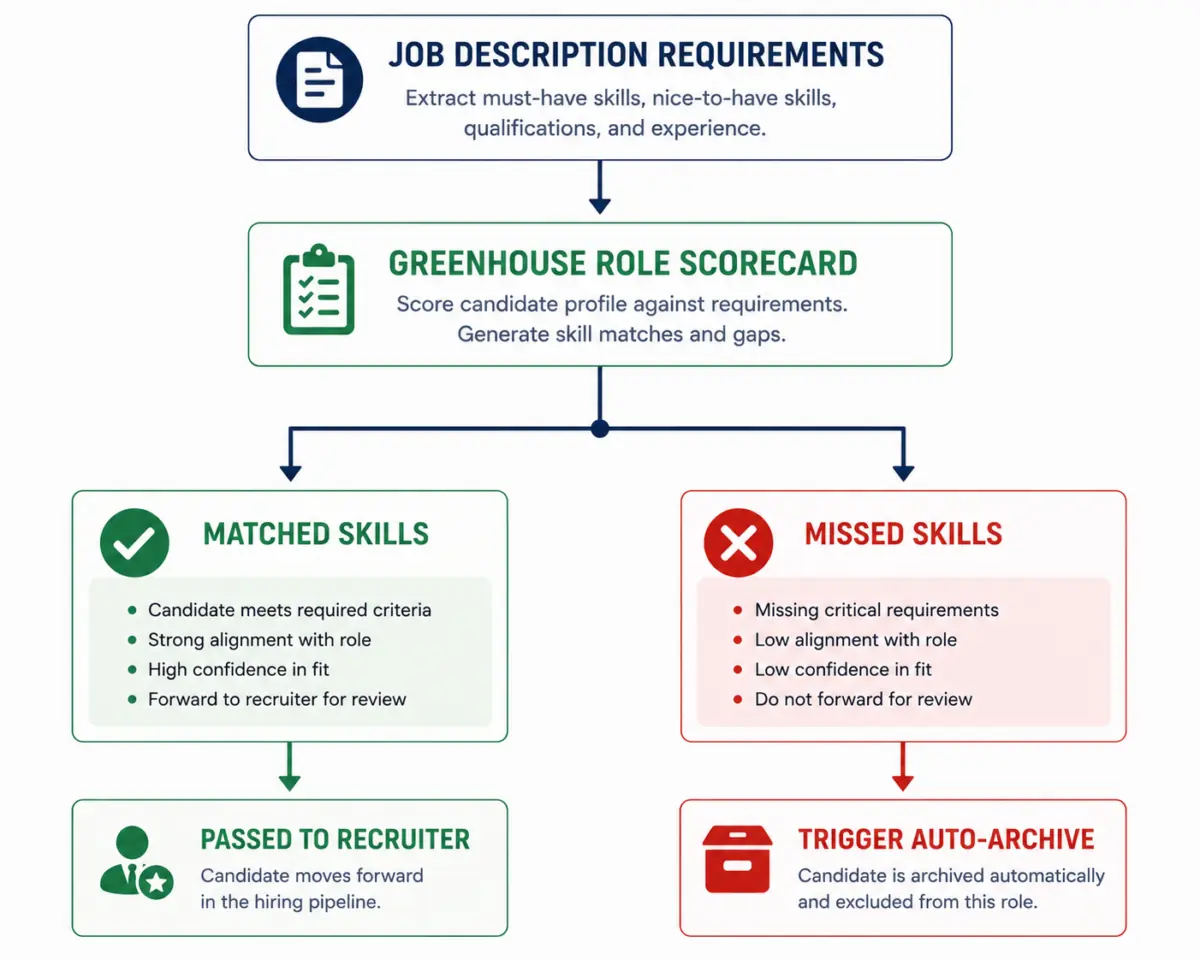
Greenhouse is built on the concept of “Structured Hiring.” Before a job is even posted on Greenhouse, the hiring team must define a strict scorecard consisting of specific competencies, skills, and experience thresholds.
When your resume enters Greenhouse, it is parsed and mapped directly against this predetermined scorecard. Greenhouse relies heavily on structured application questions to pre-screen candidates. The parser’s primary job is to extract data to auto-fill these fields and highlight key scorecard competencies for the recruiting coordinator.
If the hiring team has configured a “Knockout Question” (e.g., “Do you have 3+ years of experience with async Python frameworks?”), and your parsed resume cannot verify this experience automatically, Greenhouse will automatically tag or archive your application based on automated routing rules.
Under the Hood: How Modern Parsing Engines Decrypt Your Experience
Neither Lever nor Greenhouse built their own parsing technology from scratch. Instead, they license enterprise-grade parsing engines like Textkernel or Sovren (now DaXtra). These engines use natural language processing (NLP) and machine learning models to analyze text layers.
The parsing process happens in three distinct phases:
Phase 1: Document Structure Analysis
The engine first attempts to identify the layout. It looks for semantic blocks of text to locate the boundaries of your “Work Experience,” “Education,” and “Skills” sections.
If you use a multi-column layout, the parser has to guess the reading order. Many older or poorly configured instances of these engines read horizontally across the entire page, merging text from Column A and Column B into a nonsensical string.
Phase 2: Entity Extraction and Classification
Once the blocks are defined, the parser uses named entity recognition (NER) to extract specific values:
- Job Titles: Maps your title against a taxonomy of standardized roles (e.g., “Lead Staff Engineer” is mapped to “Software Engineering Lead”).
- Companies: Verifies company names against external databases to determine company size, industry, and prestige.
- Dates: Converts your date formats into standard ISO strings to calculate your precise tenure at each job and identify employment gaps.
- Skills: Extracts nouns and noun phrases and matches them against a proprietary library of hundreds of thousands of skills.
Phase 3: Semantic Profiling
In 2025 and 2026, both Lever and Greenhouse integrated advanced LLM-assisted semantic search capabilities. The system no longer just counts keywords; it assesses the context of those keywords.
For example, the parser understands the difference between “Managed a team using Python” and “Wrote highly optimized Python microservices.” The former classifies “Python” as a secondary management context, while the latter classifies it as a primary engineering skill.
The Structural Killers: Design Elements that Guarantee De-ranking
When I audit hiring pipelines, I consistently find excellent candidates hidden in the “unmatched” pile because their resumes triggered parsing errors. If you want to pass the parser with a 99% accuracy rate, you must ruthlessly eliminate the following design elements from your resume file.
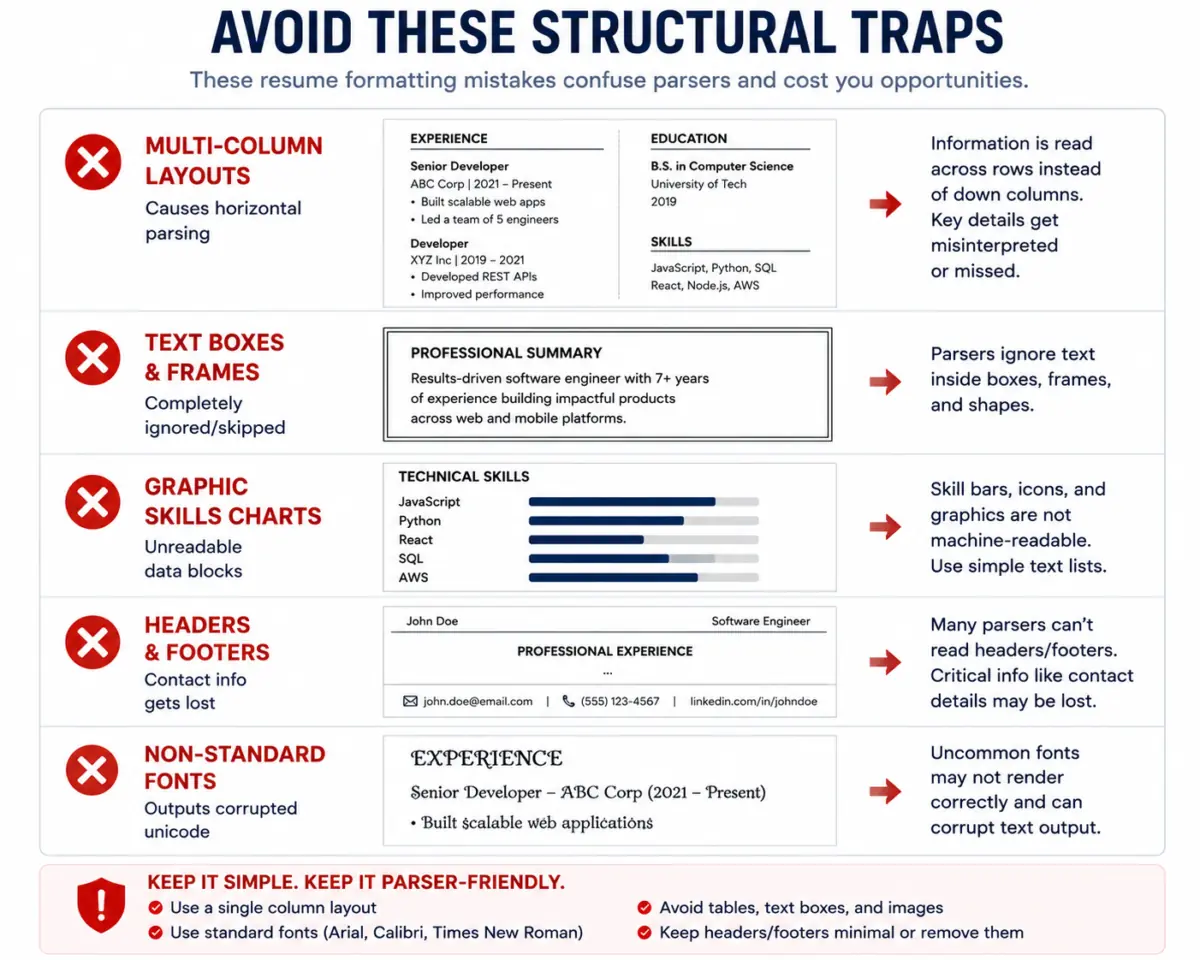
Multi-Column Layouts
While multi-column resumes look appealing to human eyes, they are the single greatest point of failure in modern ATS parsing. When a parser encounters a multi-column layout, it often fails to detect the column boundary. It reads straight across, mixing your dates, titles, and achievements into a single line of corrupted data. Keep your resume to a strict, single-column vertical flow.
Text Boxes, Shapes, and Frames
Never place your contact information, skills, or summaries inside Microsoft Word or Canva text boxes. Most parsers treat text boxes as vector graphic elements and completely ignore their contents. I once reviewed a senior product manager’s application that was systematically auto-rejected because her entire contact information section was enclosed in a stylish header box; to the ATS, she had no name, no email, and no phone number.
Graphic Skills Charts and Progress Bars
Representing your skill proficiency with a visual slider, a circle chart, or a progress bar (e.g., “Figma: 4/5 stars”) is disastrous. The parser cannot read the visual metric, and it often fails to extract the skill name associated with the graphic. Even worse, some parsers interpret these graphics as corrupt formatting blocks, downgrading the document’s overall parse confidence score.
Headers and Footers
Do not place your name, phone number, email address, or portfolio links inside the actual “Header” or “Footer” margins of your document. Many parsing configurations skip these zones entirely to save processing power, assuming they only contain page numbers. Keep your contact details in the primary body of page one.
Custom Fonts and Vector Icons
Using non-standard, custom-downloaded fonts can result in character encoding errors during the PDF conversion process. When the parser extracts the raw text layer, a word like “Kubernetes” written in an unsupported custom font may render as “K⬡b◇rn▩t■s.”
Stick to system-standard, web-safe fonts such as Arial, Calibri, Helvetica, or Georgia. Additionally, remove vector icons (like a small telephone icon next to your phone number). These are frequently parsed as random Unicode characters that disrupt the surrounding text.
Reverse-Engineering Lever’s Unified Candidate Database
Because Lever serves as a universal talent database, your objective is to maximize your discoverability. When a recruiter opens Lever, they do not review applications one by one; they run powerful database queries.
To optimize for Lever, you must align your resume with their specific database querying logic.
1. Optimize for Boolean Search Strings
Lever recruiters find candidates by writing complex Boolean search queries. A typical query for a remote engineering lead looks like this:
("Engineering Manager" OR "Software Engineering Lead") AND ("React" OR "TypeScript") AND "AWS" AND "remote" AND NOT "contractor"
To match these queries, you must include both your specific, niche titles and their broader, industry-standard equivalents. If your official company title was “Internal Platform Guru,” you must write it on your resume as:
Internal Platform Guru (Senior Systems Engineer)
This ensures you match the recruiter’s search terms without misrepresenting your internal title history.
2. Match the Skill Taxonomy Exactly
Lever matches your resume text against an internal standardized skill directory. If you write an uncommon variation of a skill, the system may fail to map it to the standard taxonomy.
- Do not write: “Expertise in writing scripts with the Python language”
- Write: “Python”
Create a dedicated “Technical Skills” or “Core Competencies” section at the bottom of your resume. Group your skills logically using simple, industry-standard category labels (e.g., “Languages,” “Frameworks,” “Databases,” “Cloud Infrastructure”).
3. Handle the Lever Candidate Merge Loop
When applying to multiple roles within the same organization using Lever, your profiles will be merged. If your resumes for two different roles are radically different, the parser will flag inconsistencies, and recruiters will see both versions side-by-side in your unified timeline.
Ensure your core professional identity remains consistent across all submissions. Do not position yourself as an “AI Researcher” on one application and a “Generalist Full-Stack Engineer” on another to the same company; this triggers a trust flag in Lever’s audit trail.
Cracking Greenhouse’s Scorecard-Driven Ecosystem
Greenhouse applications require a different strategic approach. Because Greenhouse focuses heavily on structured hiring, your resume must directly map to the specific scorecard designed for that individual role.
1. Map Your Accomplishments to the Job Description’s Verb Hierarchy
Before applying, carefully analyze the job description to identify the primary verbs and key nouns. Greenhouse scorecards are built directly from these descriptions.
If the job posting uses the verb “scale” three times (e.g., “scale distributed databases,” “scale team processes”), make sure your bullet points use the verb “scale.” If you use “grew” or “expanded” instead, the semantic engine will still match them, but you will miss the direct, high-confidence scorecard alignment that hiring managers look for when skimming candidate profiles.
2. Standardize Your Date Formats for Tenure Calculations
Greenhouse uses parsing engines to verify that you meet the minimum years of experience required for the role. If the system’s threshold is 5 years of experience, and the parser cannot read your dates, your profile may be automatically routed to a low-priority queue.
Use a clean, standardized, unambiguous date format throughout your resume. The absolute safest formats for modern parsers are:
- MM/YYYY – MM/YYYY (e.g.,
04/2022 - 08/2025) - Month YYYY – Month YYYY (e.g.,
April 2022 - August 2025)
Never use seasons (e.g., “Summer 2022”) or write only years (e.g., “2022 – 2025”). Writing only years can cause the parser to default your start date to December of the first year and your end date to January of the final year, artificially stripping nearly two full years of calculated experience from your profile.
3. Align Your Resume with Custom Application Questions
Greenhouse allows hiring teams to add custom application questions that candidates must fill out alongside uploading their resume. The parser will attempt to extract information from your resume to auto-fill these questions.
If your resume lacks a clean, parseable structure, the auto-filled answers will be corrupted, leaving you to manually re-type your entire work history into the form. When a candidate’s manual form answers deviate significantly from their parsed resume data, it flags the profile for manual compliance review, slowing down your application speed.
The Semantic Shift: Optimizing for LLM-Assisted Screening in 2026
Both Lever and Greenhouse now use integrated LLMs to assist recruiters. These AI models do not simply scan for keyword matches; they read your bullet points to infer your level of autonomy, impact, and specialized expertise.
To perform well under LLM evaluation, your bullet points must follow a highly structured impact model. Avoid vague summaries of your daily responsibilities. Instead, write results-oriented statements that show scale, ownership, and measurable business outcomes.
Use this standardized structure for every bullet point on your resume:
Action Verb + Technical Context + Quantifiable Metric + Business Outcome
Bad, Low-Parse Impact Bullet:
“Responsible for managing the AWS cloud infrastructure and helping the team migrate our legacy codebase to modern services.”
Why this fails semantic analysis: The phrase “responsible for” indicates passive participation rather than active ownership. The technical details are vague, and there are no metrics to show scale or actual business value.
Excellent, High-Parse Impact Bullet:
“Architected and migrated 14 legacy microservices to AWS EKS using Terraform, reducing cloud infrastructure spend by 34% while improving application deployment velocity by 3x.”
Why this succeeds semantic analysis: The verb (“Architected and migrated”) shows clear, high-level ownership. The technical context (“AWS EKS,” “Terraform”) is explicit and highly parseable. The metrics (“14 microservices,” “34% reduction,” “3x velocity”) provide clear evidence of scale and business value.
The Bulletproof Formatting Blueprint
To ensure your resume passes both Lever and Greenhouse parsers with perfect accuracy, build your document using these technical specifications:
- File Format: Export as a standardized PDF. Do not use secure or password-protected PDFs, as parsing engines cannot decrypt them. If you are applying to highly legacy systems, DOCX is occasionally safer, but for Lever and Greenhouse, a clean PDF with a recognizable text layer is ideal.
- File Name: Use a simple, search-optimized naming convention:
Firstname_Lastname_Target_Role.pdf(e.g.,Jane_Doe_Staff_Infrastructure_Engineer.pdf). - Margins: Set your page margins to a standard 0.5-inch or 1-inch border on all sides. This keeps the text blocks within predictable boundaries for the layout analyzer.
- Grid Layout: Keep your layout completely linear. Avoid tables, columns, or sidebars. The text should read continuously from top to bottom, left to right.
- Section Headers: Use clear, standard, predictable headings for your core sections. Do not try to be creative with your titles:
- Use: Work Experience or Professional Experience (not “My Professional Journey”)
- Use: Education (not “Where I Learned”)
- Use: Skills or Technical Skills (not “My Superpowers”)
A Remote-First Optimization Protocol
Before you submit your resume to any Lever or Greenhouse job board, run through this tactical quality-assurance checklist to verify that your document is fully optimized.
Step 1: The Raw Text Layer Extraction Audit
This is the most reliable way to check what the parsing engine actually sees:
- Open your finalized resume PDF in a standard PDF viewer (such as Adobe Acrobat or Google Chrome).
- Press
Ctrl+A(Windows) orCmd+A(Mac) to select all text on the page. - Copy the highlighted text and paste it into a basic plain-text editor like Notepad or TextEdit.
- Read through the pasted text from top to bottom.
Are the sections out of order? Is your contact information mixed in with your work experience? Did your multi-column text merge horizontally into a confusing jumble of words? If the plain text file looks disorganized, the parser will see it exactly the same way, and you need to simplify your document’s layout.
Step 2: Key Skills and Tools Match Rate Verification
Verify that your resume includes the core technologies and skills listed in the job description:
- ⬜ You have cross-referenced the target job description and identified the top 5 mandatory skills.
- ⬜ These 5 skills appear at least twice in your work experience bullets, wrapped in clear, outcome-focused context.
- ⬜ You have listed these skills using their exact industry-standard spelling and capitalization (e.g., “TypeScript,” not “Typescript” or “TS”).
Step 3: Layout and Structural Integrity Verification
Ensure your layout is completely free of formatting elements that cause parsing failures:
- ⬜ Your document uses a single-column layout with a continuous, top-to-bottom reading flow.
- ⬜ All contact details (email, phone, LinkedIn URL) are written in the main body of page one, not in a header or footer.
- ⬜ There are no text boxes, visual charts, progress bars, or graphic icons anywhere in the file.
- ⬜ Your dates use a consistent, standard format (e.g.,
05/2021 - 12/2024orMay 2021 - December 2024). - ⬜ The file is exported as an unlocked, unsecured PDF with a fully selectable text layer.
 About the author Joshua Ward
Startup Recruiter · Talent Advisor · UK Hey, I’m Josh — a recruiter-turned-writer based in London. I’ve helped build early teams at over 25 startups in the past 7 years, mostly in SaaS and fintech. Now I share insights about how small companies hire, what hiring managers really look for, and how to stand out in a noisy job market.