In this article
You open chat before starting a difficult piece of work, partly to clear a few small requests first. Forty minutes later, you have answered two questions, acknowledged three updates, found a link for someone, and agreed to review something later. The original work is still waiting, except it now has less time and less of your attention.
The unexpected cost is not simply distraction. A chat tool turns every incoming message into a possible commitment before you have decided whether it deserves immediate action. For individual contributors, especially those who depend on other people’s information to move work forward, shutting chat entirely is rarely realistic. Keeping it open all day is not neutral, either.
Try a two-week experiment instead: replace continuous checking with explicit message-triage windows, a clear escalation route, and a small record of what actually happens. The purpose is not to prove that chat is bad. It is to learn which requests truly need an immediate response, which can wait for a scheduled check, and what important work becomes possible when every message does not get equal access to your attention.
Why constant checking creates a queue you cannot see
A message can be quick to answer and still be expensive. The cost often appears when you return to a task that required judgment: drafting a recommendation, tracing a defect, preparing a design critique, or comparing alternatives before a decision. You have to remember the open question, recover what you had ruled out, and decide what to do next.
Research on task switching consistently finds that changing tasks carries a performance cost, particularly as work becomes more complex or less familiar. The American Psychological Association’s overview of switching costs is useful here because it separates the visible act of answering a message from the less visible work of resetting goals and rules when you return. The point is not that every interruption is equally damaging. It is that a stream of small, self-initiated switches can make a demanding task feel strangely resistant to progress.
There is another reason continuous checking is hard to evaluate: chat produces evidence of responsiveness. You can see sent replies, reactions, and cleared notifications. The work displaced by those actions is harder to count. A proposal remains a draft. A difficult analysis gets postponed until late afternoon. A decision that needed careful preparation becomes a rushed answer in the next meeting.
Do not start by assuming every incoming message is avoidable. Some are legitimate interruptions: an incident needs context, a customer-facing deadline has changed, or a colleague is blocked by information only you have. A useful experiment distinguishes those cases from routine requests that merely arrive before you planned to handle them.
| Message pattern | What is at risk if you wait? | Default handling during the experiment |
|---|---|---|
| A production issue, safety concern, or time-sensitive customer commitment | Immediate harm, missed commitment, or an expanding operational problem | Use the agreed escalation route and respond as soon as you see it. |
| A colleague cannot continue without a fact, approval, or access you control | Their work pauses, but the consequence is usually bounded | Reply in the next triage window; agree on a faster route if the block has a fixed deadline. |
| A request for review, background, or a non-urgent preference | No immediate consequence beyond waiting | Add it to a queue and answer in a scheduled window. |
| An update, reaction, or information copied for awareness | Usually none | Read during a later scan; do not turn awareness into an instant task. |
Microsoft researchers studying office task switching noted that returning to complex, long-running work was poorly supported by ordinary tools. Their diary study of interruptions and task switching is a useful reminder that people are often managing several strands of work across different places, not moving neatly from one completed task to the next. Your experiment should therefore protect the return path as well as the focus period itself.
A fast reply is not automatically an urgent reply.
Set a response rule before you change your settings
Turning off notifications without telling anyone can transfer the cost to colleagues. They may send repeated messages, start a meeting, or assume you are unavailable when you are simply concentrating. The experiment works better when the rule is visible and limited: people should know when you check chat, what counts as urgent, and where to go if waiting would create a real problem.
Choose a pattern that matches the work you actually do. Someone supporting a live launch may need shorter windows than someone writing a technical plan. A researcher whose manager expects same-day answers may use three windows rather than two. Do not borrow someone else’s schedule because it sounds disciplined. Make a specific promise you can keep.
For many roles, two or three defined scans work better than an elaborate timetable: one early enough to catch overnight developments, one after a substantial work block, and one before you close the day. Outside those windows, mute nonessential alerts rather than disappearing from every channel.
| Rule element | Decide it in advance | Example wording |
|---|---|---|
| Triage windows | When you will read and act on ordinary messages | “I check project chat around 10:30 a.m., 1:30 p.m., and 4:30 p.m. Eastern.” |
| Urgent route | One channel reserved for a genuine time-sensitive issue | “For a customer-impacting issue or a decision needed today, call me or use the incident channel.” |
| Boundary | What does not qualify for interruption | “Requests for routine review can stay in the project thread; I will pick them up in my next scan.” |
| Exception | When you will suspend the rule | “During release coverage, I will remain available in the release channel.” |
This is not a personal productivity ritual imposed on everyone else. It is a temporary working agreement around your availability. Atlassian’s guidance on deciding when an update belongs asynchronously and when people need to meet makes a practical distinction: distributing information, providing a summary, and asking for non-urgent help can happen without simultaneous attention. High-impact decisions or work with substantial unknowns may need real-time discussion. Apply the same distinction to your messages.
State the rule in the project channel, team chat, or wherever people normally look for you. You do not need a long explanation. A short message is enough: “I’m testing scheduled chat checks for the next two weeks so I can finish the planning work without missing urgent issues. I’ll check here at 10:30, 1:30, and 4:30. Please call me or use the launch channel if a customer issue needs action before then.”
Make an urgent route narrow enough to mean something
If every request can be labeled urgent, the experiment has no control condition. Define urgency by consequence and timing, not by someone’s preference for a fast reply. “I need an answer before my meeting tomorrow” may be important, but it does not necessarily require you to interrupt a task at 10:12 a.m. “The customer cannot complete a required step and support needs the workaround now” is different.
You may discover that your team has never made this distinction. That is useful evidence, not a reason to abandon the test on day one. Ask your manager or project lead to confirm the escalation route where the consequence of delayed response is unclear.
Treat chat availability as a working agreement, not a personal virtue.
- Choose two or three chat-triage windows that fit your role and meeting schedule.
- Name one urgent route that people can use when a delayed answer would create a real consequence.
- Write one sentence defining what is urgent in your work, using consequence and deadline rather than sender preference.
- Post the temporary availability rule in the channel where close collaborators will see it.
- Confirm any customer, launch, or incident coverage that requires an exception.
Run a baseline week, then change one thing
The common mistake is to introduce a new chat routine and judge it by mood. One quiet day can make it seem brilliant; one deadline can make it seem impossible. A small baseline gives you something better to compare: the actual pattern of interruptions, the work you intended to finish, and the requests that really could not wait.
For five working days, change nothing. Keep a short log each time chat pulls you away from a planned priority task. Do not record every message or criticize yourself for checking. Record only enough to see the pattern: what you were doing, what caused the switch, whether the request required immediate action, and how easily you resumed.
| Record | Keep it brief | What it helps you see |
|---|---|---|
| Primary task | “Drafting options for onboarding change” | Which work repeatedly loses its place |
| Trigger | Direct message, mention, notification, or self-initiated check | Whether the switching is external, habitual, or both |
| Request type | Urgent issue, blocker, review, update, or social message | Which categories deserve different handling |
| Immediate action needed? | Yes, no, or unclear | Whether urgency was established or assumed |
| Return point | Easy, moderate, or difficult to resume | Where a message creates the largest recovery cost |
In week two, keep the same planned priority work where possible, use your stated triage windows, and preserve the urgent route. Do not simultaneously start a new task manager, rearrange your calendar, and block every notification on every device. You are testing a message-handling rule, not redesigning your entire workday.
Before every focus block, write a one-line return cue in the work itself or a nearby note: “Next: compare option B against the support constraint; open question: can operations own the manual step?” Research on interruption recovery suggests that cues pointing to the next action can improve recovery after a switch; a 2025 study of task-interruption cues found benefits from prompts that directed people toward the next step. Your note does not need to be sophisticated. It needs to be concrete enough that you do not reopen the work and start reconstructing your own thinking.
| Phase | Your action | What stays stable |
|---|---|---|
| Days 1–5: baseline | Log meaningful switches away from priority work; use chat normally. | Current notification settings, normal meeting load, and normal response habits. |
| End of day 5 | Review the log and select two or three triage windows plus one urgent route. | The same definition of priority work for the following week. |
| Days 6–10: test | Use the windows, post the availability note, and leave a return cue before switching tasks. | Keep ordinary requests visible; do not silently ignore them. |
| End of day 10 | Review outcomes and decide whether to keep, adjust, or stop the practice. | Judge both work progress and collaboration consequences. |
An interruption deserves a route; a routine request deserves a queue.
- Log only the meaningful switches away from planned priority work for five working days.
- Mark each switch as urgent, blocking, routine, informational, or unclear.
- Select one priority task type to protect during the test week.
- Mute nonessential alerts outside triage windows while keeping the agreed urgent route available.
- Write a concrete next-action cue before leaving demanding work.
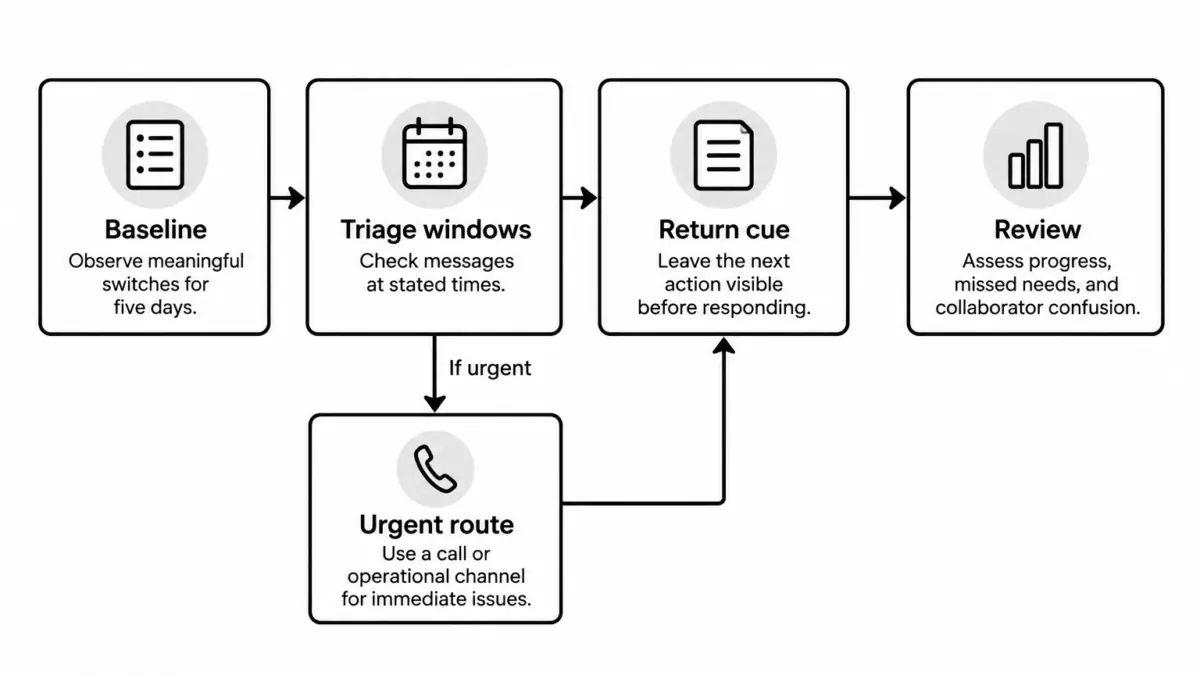
Text version of this visual
- Baseline: Observe meaningful switches and the difficulty of returning to priority work without changing normal behavior.
- Triage windows: Check ordinary messages at stated times and process only the decisions that belong in that window.
- Urgent route: Reserve a call or operational channel for issues where waiting creates an immediate consequence.
- Return cue: Leave the next concrete action visible before responding, so restarting does not require rebuilding the task.
- Review: Assess work progress, missed needs, and collaborator confusion before deciding what to keep.
Read the result without rewarding silence
A successful test is not one where nobody interrupted you. It is one where routine requests stopped dictating your sequence of work while people could still get help when delay had a real cost.
At the end of each day in the test week, answer four questions in a few lines. Did you complete the planned next step on your priority work? Did any truly urgent issue wait too long? Did someone have to chase you because the route was unclear? Did scheduled checking make you spend a long, draining burst of time catching up?
That last question matters. Batching messages can create a dense pile of decisions if you leave too much time between scans or if every scan becomes a place where you begin new work. A triage window has one job: identify what needs a response, answer what can be answered briefly, and convert longer requests into a visible next action. It should not become a second inbox where your day disappears.
| What you observe | Likely explanation | Adjustment for the next week |
|---|---|---|
| Priority work moves further, and ordinary requests receive timely answers. | Your window spacing and escalation route fit the role. | Keep the rule and publish it where new collaborators can find it. |
| You miss a few genuine blockers, but most messages can wait. | The urgent route is vague or colleagues do not know it. | Clarify the trigger and route; do not reopen all notifications by default. |
| You spend too long processing each window. | Windows are too far apart, or you are doing full tasks while triaging. | Add a shorter scan or create a separate queue for work that needs more than a quick answer. |
| You feel calmer, but the priority task still does not advance. | Chat was one contributor, not the main constraint. | Examine meeting load, unclear scope, missing information, or an unrealistic work commitment. |
Be particularly careful with the fourth outcome. Productivity advice can tempt people to treat every stalled task as a focus failure. Sometimes the problem is dependency: you cannot finish a requirements document because nobody has made the underlying product decision. Sometimes it is capacity: a support rotation and a major planning assignment have been scheduled as if both deserve uninterrupted attention. Scheduled triage cannot solve a work-design problem, but it can make that problem easier to name.
Do not turn responsiveness into a private burden
Employees who are already expected to be highly available may worry that any missed message will be treated as proof that the experiment was irresponsible. That risk is real in teams with unclear expectations or uneven standards. Do not make yourself the sole owner of that ambiguity. If your work requires rapid response, ask for a concrete service expectation: which channel, what kinds of requests, and what response time are actually required?
Then test within that boundary. You might retain alerts from one operational channel while scheduling every other chat space. You might use shorter windows on customer-facing days and longer blocks on planning days. The right rule is not maximal silence. It is a response pattern that matches the consequences of your role.
If focus improves but the work still cannot move, look for a dependency rather than blaming attention.
- Compare priority-work progress in the baseline and test weeks.
- List every issue that truly needed a faster response and identify how it should have reached you.
- Notice whether message windows became long periods of unplanned task work.
- Ask one frequent collaborator whether the availability rule was clear enough to use.
- Choose one adjustment rather than abandoning the whole practice after a difficult day.
Keep the rule that protects both the work and the relationship
After two weeks, choose one of three outcomes. Keep the routine if it protected meaningful work without causing missed commitments. Adjust it if the underlying idea worked but the window timing, escalation route, or message categories were wrong. Stop it if the role genuinely requires continuous monitoring and there is no team-supported way to share that coverage.
If you keep it, make the practice less dependent on personal memory. Put the urgent route in the project brief, set a recurring reminder for your scan times if needed, and leave return cues before difficult work. If a colleague asks why you are not always immediately available, answer in terms of work, not self-protection: “I check this channel at set points so I can complete the analysis. If the launch is blocked, call me and I’ll switch.”
One question is worth carrying into the next week: Which messages need my answer now, and which merely arrived now? Use it before you click into chat. It gives you a practical way to preserve attention without pretending that collaboration can wait forever.
 About the author Victoire Boucher
Career coach focused on helping women navigate the tech industry. I’ve worked in product and engineering roles before shifting to coaching full-time. Now I write about imposter syndrome, salary negotiation, and how to grow without burning out.